
What Are Yu-Gi-Oh! Cards Marked ©1996 Worth? Find the Actual Printing
The ©1996 line does not tell you what your Yu-Gi-Oh! card is worth. It is a copyright notice. It does not, by itself, establish the card’s release date, First Edition status or scarcity.
Before searching for a “1996 price list,” read the card’s set code and identify the actual printing. Then check its edition, rarity, language and physical condition. Those details give you a meaningful price comparison; the copyright year alone does not.
You can follow the steps below with one card, a clear light and a notebook. A scanner can help you find the card and record it, but you still need to check the copy in your hand.
Why does a later card say ©1996?
A copyright line identifies rights in the underlying work. It is different from a product’s release information. For example, VIZ’s copyright notices include the 1996 Kazuki Takahashi credit alongside later Yu-Gi-Oh! series. Konami’s 2017 New Player Guide also carries that credit.
Treat the line as one part of the card’s markings, rather than a manufacturing date. You do not need to reconstruct the entire history of Yu-Gi-Oh! to identify your copy. Start with the release information printed on the card itself.
1. Find the set code, not just the long number
Look near the lower-right edge of the illustration for a code containing letters and numbers. On Pendulum Monster Cards, the set number appears toward the bottom left instead. TCGplayer’s identification guide explains the layout and notes exceptions on older cards.
Write down the whole code, including its prefix, any language or regional letters, hyphen and final number. LOB-102 and LOB-EN102 should be recorded exactly as they appear, rather than shortened to “LOB.”
Keep these markings separate:
| Marking | What to do with it |
|---|---|
| Card name | Use it to find the card, then narrow down its releases. |
| Set code | Compare it with the matching release record. |
| Numerical password, when present | Keep it separate from the set code; it is not the release date. |
| Edition text | Record “1st Edition,” “Limited Edition” or the absence of those marks. |
| Copyright line | Copy it if useful, but do not turn it into a price or release year. |
If the code is hard to read, take a sharp photograph and enlarge that area. Leave an uncertain character unresolved until you can compare it. A guessed code can send the rest of your search toward the wrong product.
2. Check a release record: a Metal Dragon example
Search the card name in Konami’s official card database, open the card and inspect its listed sets.
The official English Metal Dragon record illustrates why the exact code matters:
| Set code | Release shown in the official record | Date shown |
|---|---|---|
LOB-102 | Legend of Blue Eyes White Dragon | March 8, 2002 |
LOB-EN102 | Legend of Blue Eyes White Dragon, LC01 25th Anniversary Edition | April 21, 2023 |
These are two release records for the same named card. They are not a “1996 value,” and the dates shown are not a valuation. Use the record matching your copy, then continue checking the details that distinguish copies within that release.
This example uses the official English database’s dates. For a different language or region, check that release rather than applying the table to every Metal Dragon card worldwide.
3. Read the edition and inspect the finish
Look for the actual edition text. A familiar character, an old-looking layout or the copyright notice does not establish First Edition status.
The small security foil is another marking, but gold alone does not mean First Edition: Konami’s introduction describes gold security foil on both First Edition and Limited Edition cards. Read the edition text as well. Our First Edition versus Unlimited guide explains that check in more detail.
Next, inspect the card under angled light. Note which parts are foil: the name, artwork, border or wider surface. Compare those features with the known rarities for the release. The rarity guide helps you describe the finish; a matching name or set code does not always settle every variant.
If you cannot distinguish the finish, keep that uncertainty in your notes. Do not silently choose the most expensive result.
4. Inspect the physical copy before comparing a price
Check the front and back, corners, edges and surface. Note creases, whitening, scratches or other visible wear. Keep raw and professionally graded copies separate when researching prices.
Use the condition terminology of the marketplace you are checking. Cardmarket’s condition guide explains its scale and acknowledges that assessments can differ. “Old” is not a condition grade, and a scanner match is not a physical inspection.
For a closer look at visible wear, use our card-condition guide. If you have doubts about authenticity, do not treat a database match as proof that the physical card is genuine.
5. Find the card in YuScan and review the saved entry
On iPhone or Android, scan the card or search its name. Open the result and compare the available printing information with your notes. Correct the selection where needed before adding the copies you own to a collection.
Use the card in your hand as the reference. Recognition can find the right name while still requiring printing review. Do not assume a scan established the edition, finish or condition for you.
Find the card, then check your collection

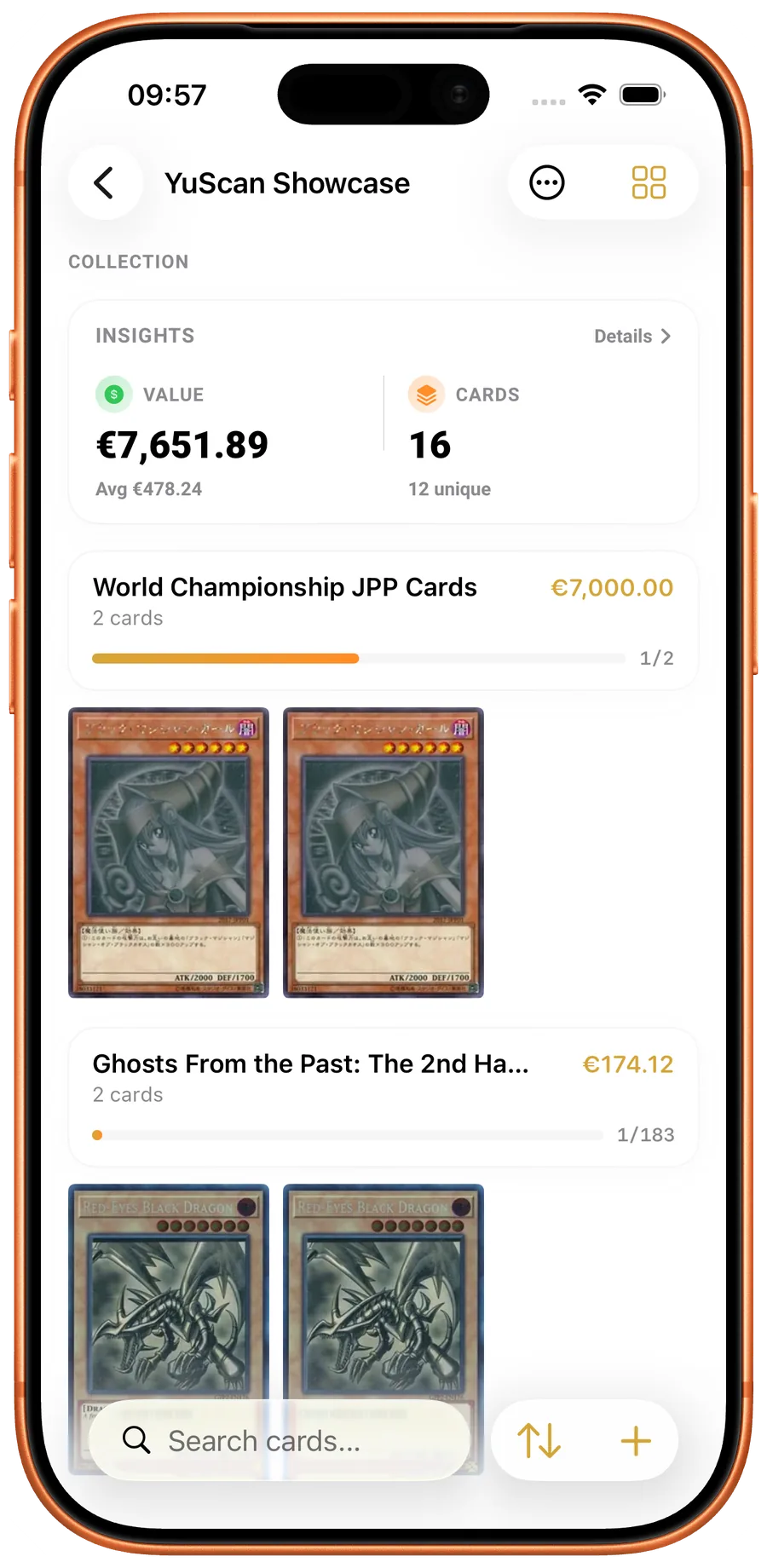
Real iPhone and Android app screens, captured on 23 October 2026 with sample collections. Switch platforms to see the corresponding app. Values are examples; currencies follow each capture’s app settings.
After saving, reopen the collection. Check that the intended card is present and the quantity matches your physical copies. The app screens show example data; they are not a valuation of the historical printing in the table above.
On YuScan
Scan a card and review the result
Use YuScan on iPhone or Android, then compare the result with the physical card before recording it.
6. Compare the matching printing, then keep a dated note
Search for the complete identity you have established: name, set code, edition, rarity and language. Compare similar physical condition. A listing for a graded First Edition copy is not an equivalent reference for a worn raw Unlimited copy.
Distinguish an asking price from a completed sale and an app estimate. Record the source and the date you checked it. An available estimate is a reference, not a buyer’s offer; an unavailable quote is unknown, rather than zero.
Our price-check workflow takes that comparison further. If two copies with the same name show very different values, read why prices vary by printing.
Your finished card record
You are ready to make a useful comparison when your notes contain:
- The exact card name and complete set code.
- Edition text, language and the finish you verified.
- A description or photographs of the physical condition.
- A matching price reference with its source and check date, or a clear “not yet verified.”
- The correct number of copies saved in your collection.
That record answers a much more useful question than “What are 1996 cards worth?” It tells you which card you own and what the available comparison actually describes.
If you are preparing the whole binder for sale, continue with how to prepare a Yu-Gi-Oh! collection for sale.
YuScan · iOS & Android
Scan your cards. Keep track of every copy.
Check the printing, organize your collection and build a deck with YuScan for iOS and Android.
- Card scanner
- Set code and rarity
- Edition, language and quantity